MyRACMA

If you do not have a username or password, please contact us with your details.

Please complete the steps below to ensure successful access to the Member Hub.

  • Go to the MyRACMA portal website [Top Righthand Side of this website]
  • Enter your username: [email address]
  • Enter your password: [if you have not set your password beforehand, please click "forgot your password"]
  • Click the "Login" button.

If you have any problems, please get in touch with IT Support by emailing helpdesk@racma.edu.au

Support for CPD Queries

The following key College contacts are available to support people who choose to complete their CPD with RACMA:

  • Chair of the CPDP Committee
  • CPD Coordinators (Appointed in each jurisdiction to support CPD completion and audits)
  • CPD Lead Fellow
  • CPD Manager and Co-ordinator 

Please email cpd@racma.edu.au for support with your CPD.

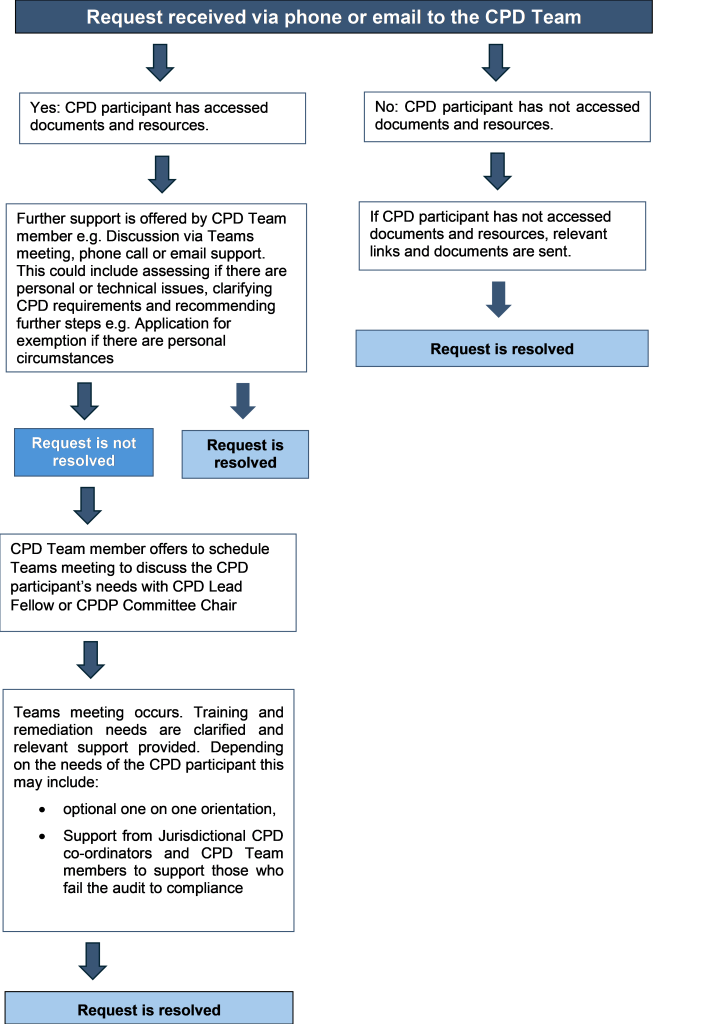
The main processes used to provide CPD support to members are outlined in the flow chart below.
Please note: MyRACMA will be down for scheduled maintenance from 3pm - 8pm today.